A full-screen online stopwatch for big screens (and what search data taught me about how it is used)
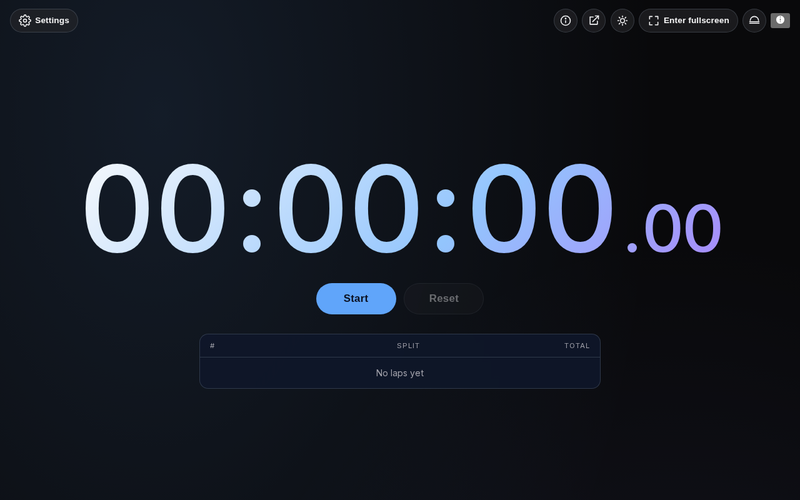
The online stopwatch on Omikuji Tools fills the screen with the elapsed time, records laps, and has a few styles and colors. It has been around for a while, in 12 languages. What I did not expect was where people use it.
The Chinese version took off on big screens
Search impressions for the Chinese page went from 65 to 9,004 a week within six weeks, at the same ranking position. The queries that drove it were about using a timer on a large display: classrooms, events, projectors. The tool had been designed with a single person at a desk in mind.
So the full-screen button, which used to be an icon only, now has a text label in every language, and the page explains how to put it on a projector. On a big screen the label is the first thing people look for.
A bug the big screen made obvious
While checking every language, I found that the colons and the millisecond digits were invisible in production, in all languages: the time read "00 00 00". The digits are drawn with a CSS gradient clipped to the text (background-clip: text), and the colon elements had an opacity to make them fainter. An element with opacity is composited on its own layer and falls out of the parent's clip, leaving only text-fill-color: transparent. Removing the opacity fixed it, and there is now a test that checks the colon is actually painted.
Features
- Start, stop, lap, reset; keyboard shortcuts
- Full-screen mode with a large, tabular-figure display
- Lap list with split and total times, fastest and slowest highlighted
- Styles, theme colors, millisecond toggle
- Runs entirely in the browser; keeps running if you switch tabs


Comments
Post a Comment