Waridake: a macOS window snapper that only splits the screen
Besides the web tools, I publish two pieces of software you install yourself. The first is Waridake ("just split it" in Japanese), a window-snapping app for macOS. Free, open source, MIT licensed.
What it does (this is the whole list)
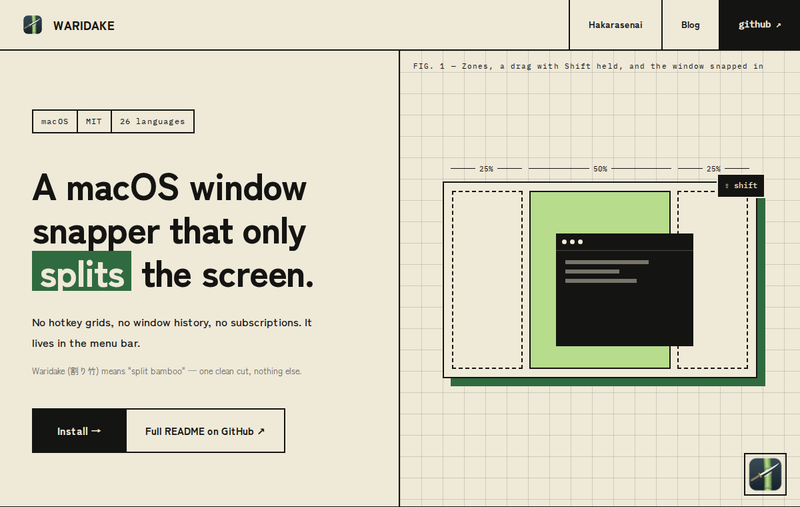
- You keep one layout that slices the screen into zones
- While dragging a window, hold Shift and the zones appear
- Release the mouse over a zone and the window snaps into it
There is no layout editor, no hotkey grid, no window history, no Pro version. It lives in the menu bar and nothing else. It is the "this is all I need" part of the snapping apps I used before, rebuilt on its own.
One JSON file for the layout
The layout is ~/.config/waridake/layout.json, created on first launch. Each zone is a fraction of the screen's working area (x, y, w, h from 0 to 1) plus a gap in points. The default is a left column split in three (25%), a wide center (50%) and a right column (25%): six zones. Zones may overlap; the first one under the mouse wins. On multiple displays the same fractions apply to whichever screen the mouse is on.
Install
With the Xcode Command Line Tools installed, clone the repository and run make install; the app lands in /Applications/Waridake.app. On first launch macOS asks for Accessibility permission, which the app needs to watch your drags. Turn it on in System Settings and relaunch.
The README and the UI are available in 26 languages.


Comments
Post a Comment