EXIF Cleaner and Batch Watermark: two photo tools that never upload your photos
Two image tools on Omikuji Tools for the step just before a photo goes public. The EXIF Cleaner strips the metadata your camera or phone wrote into the file, GPS location included. Batch Watermark stamps text or a logo onto a whole set of images. Both do the work inside your browser: the photos are never sent to a server.
EXIF Cleaner: remove the data, keep the pixels
Drop in JPEG, PNG, WebP or HEIC files (whole folders work too) and the tool shows what each one carries: GPS, date and time, camera details, descriptions, copyright. Strip all removes everything that is not needed to display the image. Custom lets you choose by category, for example remove GPS but keep Copyright and Artist.
For JPEG, PNG and WebP it works on the file's structure rather than redrawing the picture. It rewrites the metadata segments and chunks (the EXIF block, XMP, IPTC, comments, PNG text chunks) and passes the image data through untouched, so there is no re-compression. Color profiles and gamma are kept, because removing them would change how the image looks. HEIC is the exception: it is redrawn and saved as JPEG, which only works in browsers that can open HEIC in the first place. Your originals are never overwritten, and several files come out as one ZIP.
Batch Watermark: the same mark on every size
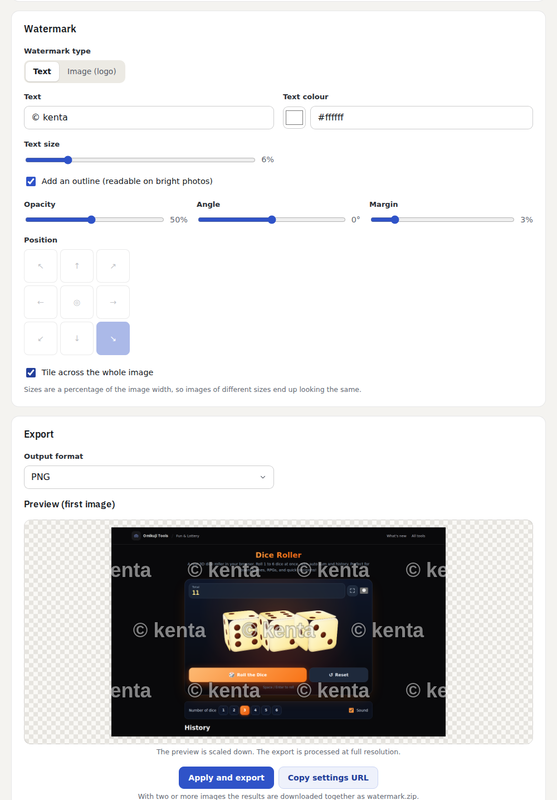
Choose text (with color, size and an optional outline) or a logo image, then set opacity, angle and margin, and place it in one of nine positions or tile it across the image. Sizes are a percentage of the image width, so a 4000-pixel photo and an 800-pixel screenshot come out with the mark in the same proportion. The preview is scaled down; the export runs at full resolution in PNG, JPEG or WebP. One image downloads directly; two or more (up to 50) come as a ZIP built in the browser with JSZip. Copy settings URL shares your settings, never the images.
The FAQ is honest about limits: a watermark is burned into the pixels, but anyone can still paint over it or crop it out. A faint mark over the subject, or tiled, is much harder to remove than a small one in a corner.
Features
- EXIF Cleaner: JPEG / PNG / WebP / HEIC, strip all or by category, folder drop, ZIP export, no re-encoding for JPEG / PNG / WebP
- Batch Watermark: text or logo, nine positions or tiling, width-relative sizing, up to 50 images, ZIP export
- Nothing is uploaded; the watermark tool keeps only its settings, never the images, in the URL and in localStorage


Comments
Post a Comment